
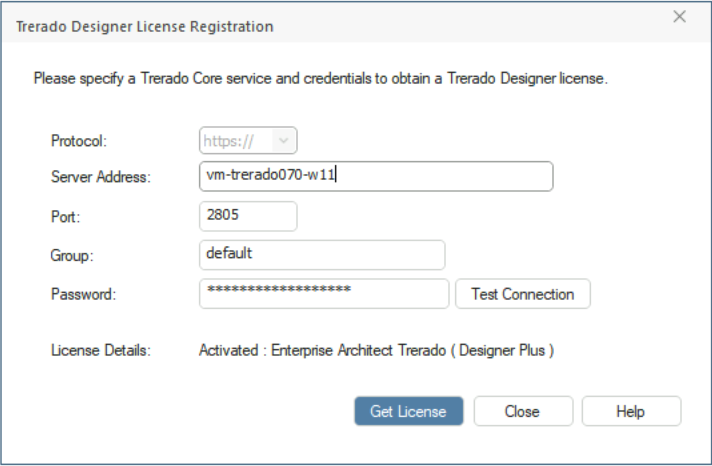
Trerado Designer License Registration Dialog
The purpose of this dialog is to authenticate with Trerado Core and retrieve a license key. The user specifies the details (as supplied by administrator) and clicks on "Get License". The Trerado Core service will supply a key if it can. If Trerado Core cannot supply a key, Trerado Designer will not start.
Once you connect to a Trerado Core service, you can only connect to models on that service. The server connection dialog lists the models available on the specified Trerado Core service.
Access
When a user starts Trerardo for the first time, the 'Trerado Designer License Registration' dialog is displayed.License Types
There are two license key types available for Trerado: 'Trerado Designer Plus' and 'Trerado Designer'. The 'Trerado Designer Plus' license provides features along the lines of EA's Ultimate edition and 'Trerado Designer' provides features along the lines of EA's Corporate edition.
When a connection to Trerado Core is established, it will return a Trerado Designer Plus licence OR it will return Trerado Designer licence. By default, Trerado Core will provide a Designer Plus version of the key if a mix is available. However, mixing key types is not recommended and Administrators typically would not mix the different license types within one group on PCS. Groups should be created that use only one or the other license types.
Description of Dialog Fields
Field |
Description |
|---|---|
|
Server Address |
Use this field to specify the address of the Trerado Core server. (The specified server must have Trerado Core running.) |
|
Port |
Use this field to specify the port number for the connection. |
|
Group |
Use this field to specify your Group name. This value must be the same as the Group name defined on the Trerado Core server. |
|
Password |
Use this field to enter the password for the Group. |
|
Test Connection |
Click this button to test the connection to the server. |
|
Get License |
Clicking this button will request a license key from the key server. If a key is returned and Trerado Designer is not already open, a connection to the server will be established and Trerado Designer will be started. |
Notes
If a model is currently open, all fields and buttons on this dialog will be disabled.
In order to switch to a different Trerado Core server, you must close any open model before displaying the dialog.