Please note : This help page is not for the latest version of Enterprise Architect. The latest help can be found here.
Element Icons
When you add an element to a diagram, or select an existing element, a number of small icons display off the right hand side of the element, underneath the Quicklinker arrow.
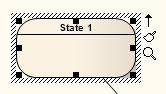 or
or 
These icons display small versions of the diagram toolbars or perform specific actions, to enable you to quickly edit the element you have highlighted.
Reference
Icon |
Description |
See also |
|---|---|---|
|
Rotates a Fork/Join element from vertical to horizontal and vice-versa.
|
|
|
Displays the Format toolbar, for changing element appearance.
|
|
|
Displays the Current Element toolbar, to edit the element's properties and features. |
|
|
When multiple elements are selected, displays the Diagram Toolbar for changing or aligning the elements together.
|
|
|
Toggles an Activity Partition between vertical and horizontal.
|