Please note : This help page is not for the latest version of Enterprise Architect. The latest help can be found here.
Team Review Resources
Whilst having a discussion through the Team Review, it is convenient to link to the resources that are the subject of discussion or that illustrate points in the discussion. Such resources include:
| • | XMI files of packages within the current project |
| • | Active Profiler reports |
| • | Images of currently-active diagrams |
| • | Images currently captured on the clipboard |
| • | Bookmarks to currently active websites |
You can link to such resources from Category or Topic notes, or from a Post. The resource links are created in a Resources folder underneath the selected Category, Topic or Post, as shown:
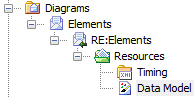
Access View | Team Review | Right-click on <object> | Share Resource | <resource type>
You create the Resources folder by creating a link to a resource underneath the selected Category, Topic or Post. Similarly, you delete the Resources folder by deleting the last resource within it. Having added a resource, you can right click on it and use a further context menu to:
| • | Reimport the package XMI files to the model or |
| • | Display the images |
Learn more